JASMINER X16-QE Troubleshooting for Connectivity Issues
Cryptocurrency mining has evolved into a sophisticated industry where efficiency, reliability, and connectivity are paramount. Among the top-tier mining solutions available today, the JASMINER X16-QE stands out as a cutting-edge device engineered for the ETCHASH and ETHASH algorithms. Its impressive hash rate of up to 1750MH/s (±10%) and industry-leading power efficiency of 0.33J/MH make it a favorite among both institutional miners and individual enthusiasts. However, even the most advanced mining equipment can encounter connectivity issues, which can disrupt operations and reduce profitability.
In this article, we’ll delve into practical troubleshooting strategies for resolving connectivity issues with the JASMINER X16-QE. Whether you’re managing a large-scale mining farm or running a home setup, understanding how to maintain seamless connectivity is crucial for maximizing uptime and efficiency.
Understanding Connectivity in the JASMINER X16-QE
The JASMINER X16-QE is designed with versatility in mind, offering both Gigabit Ethernet and WiFi connectivity options. This flexibility allows miners to adapt the device to various deployment scenarios, from data centers to home mining setups. However, connectivity issues can arise due to a variety of factors, including hardware malfunctions, network configuration errors, or environmental interferences.
Before diving into troubleshooting, it’s essential to understand the key components involved in the X16-QE’s connectivity:
- Network Interface: The device supports wired Ethernet connections via a Gigabit Ethernet port and wireless connections through WiFi.
- Power Supply: A stable power source is critical for maintaining uninterrupted connectivity.
- Cooling System: The advanced triple-fan cooling system ensures optimal operating temperatures, preventing overheating that could affect performance.
- Router/Modem: The quality and configuration of your network equipment play a significant role in connectivity.
Common Connectivity Issues and Solutions
1. Wired Ethernet Connection Failures
Symptom: The JASMINER X16-QE fails to establish a wired Ethernet connection or experiences intermittent disconnections.
Troubleshooting Steps:

- Check the Ethernet Cable: Ensure the cable is securely connected to both the miner and the router. Replace the cable if it’s damaged or worn out.
- Verify Router Settings: Confirm that the router’s Ethernet port is active and properly configured.
- Test Another Port: If possible, connect the miner to a different Ethernet port on the router to rule out port-specific issues.
- Update Firmware: Ensure the miner’s firmware is up to date, as updates often include fixes for connectivity bugs.
Pro Tip: Use high-quality Cat6 or Cat7 Ethernet cables for optimal performance and reliability.
2. WiFi Connection Instability
Symptom: The miner frequently loses its WiFi connection or experiences slow network speeds.
Troubleshooting Steps:

- Check Signal Strength: Ensure the miner is within range of the WiFi router. Walls, metal objects, and other obstructions can weaken the signal.
- Reduce Interference: Place the miner away from other electronic devices that may cause signal interference, such as microwaves or cordless phones.
- Use a Dedicated Band: If your router supports dual-band WiFi, connect the miner to the less congested 5GHz band.
- Reset WiFi Settings: Reconfigure the miner’s WiFi settings to ensure they match your network’s credentials and security protocols.
Pro Tip: Consider using a WiFi extender or mesh network system to improve coverage and stability in larger spaces.

3. Power Supply Issues
Symptom: The miner fails to power on or experiences sudden shutdowns, leading to connectivity loss.
Troubleshooting Steps:
- Inspect the Power Cable: Ensure the power cable is securely connected and free from damage.
- Check Voltage Compatibility: Verify that the power supply matches your region’s voltage standards (110-240V).
- Use a UPS: A Uninterruptible Power Supply (UPS) can prevent outages and stabilize voltage fluctuations.
Pro Tip: Invest in a high-quality power supply unit (PSU) designed for mining equipment to ensure consistent performance.
4. Overheating and Performance Degradation
Symptom: The miner becomes unresponsive or experiences reduced hash rates due to overheating.
Troubleshooting Steps:
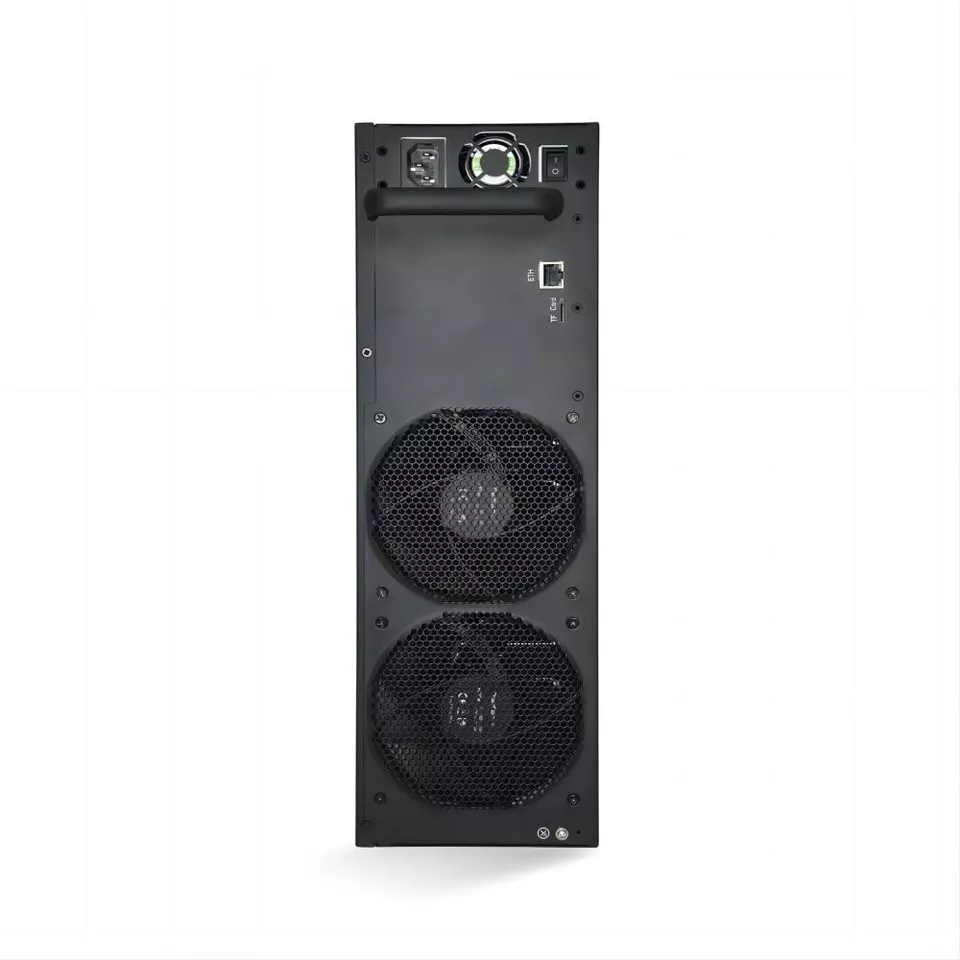
- Clean the Fans: Dust buildup can impede airflow. Regularly clean the triple-fan cooling system to maintain optimal temperatures.
- Improve Ventilation: Ensure the miner is placed in a well-ventilated area with adequate airflow.
- Monitor Ambient Temperature: Keep the operating environment within the recommended range of 0-40°C.
Pro Tip: Use external fans or air conditioning units to regulate temperature in high-density mining setups.
Advanced Troubleshooting Techniques
If the basic troubleshooting steps don’t resolve the issue, consider these advanced techniques:
1. Network Configuration Check
- Assign a static IP address to the miner to prevent IP conflicts.
- Disable any firewall or security software that may block the miner’s connection.
2. Factory Reset
Performing a factory reset can resolve software-related issues. Be sure to back up your settings before proceeding.
3. Firmware Update
Regularly check for firmware updates from JASMINER, as these often include performance enhancements and bug fixes.
4. Professional Support
If all else fails, contact JASMINER’s technical support team for expert assistance.
Preventive Maintenance and Best Practices
To minimize connectivity issues and ensure long-term reliability, follow these best practices:
- Regular Inspections: Periodically check cables, connections, and cooling systems for signs of wear or damage.
- Network Optimization: Use high-quality networking equipment and optimize your network configuration for mining operations.
- Environmental Control: Maintain a clean, temperature-controlled environment to prevent overheating and hardware degradation.
- Documentation: Keep detailed records of your miner’s settings, configurations, and maintenance history.
Conclusion
The JASMINER X16-QE is a powerhouse in the world of cryptocurrency mining, offering unmatched performance and efficiency. However, connectivity issues can disrupt operations and reduce profitability. By understanding the common causes of these issues and implementing the troubleshooting strategies outlined in this article, you can maintain seamless connectivity and maximize your mining output.
Remember, proactive maintenance and a thorough understanding of your equipment are key to achieving long-term success in cryptocurrency mining. Whether you’re a seasoned miner or just starting out, the JASMINER X16-QE is a reliable partner in your mining journey—provided you keep it connected and running smoothly.
For more tips, updates, and expert insights, stay tuned to our cryptocurrency mining community. Happy mining!